
Pick up your phone right now. There is a very high chance you are already holding it vertically. That is exactly the reason why vertical video took over social media faster than any other format shift in digital history. People watch video the same way they hold their phones, and for most people, that means portrait mode, every time.
If you create video content, stream live, or run video ads on any social platform, you have to understand the vertical video aspect ratio. Get it wrong and your video gets black bars, gets cropped by the platform, or gets ignored by the algorithm. Get it right and your video fills the whole screen, looks native to the platform, and gives viewers the immersive experience they came for.
This guide explains exactly what vertical video aspect ratio means, what the correct dimensions are for each major platform, and how to create vertical videos that look clean and professional on any screen.
What Is Aspect Ratio?
Before going further into vertical video specifically, it helps to understand aspect ratio in plain terms.
Aspect ratio is the proportional relationship between a video’s width and its height. It is written as two numbers separated by a colon, like 16:9 or 9:16. The first number always represents the width. The second number always represents the height.
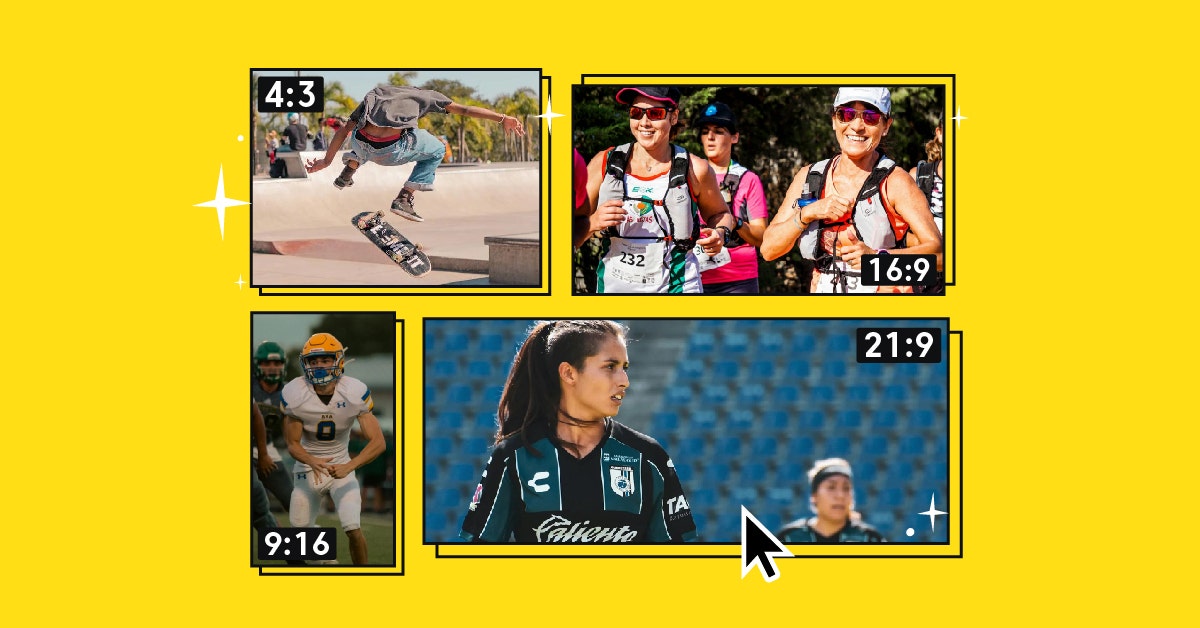
So a 16:9 video is wider than it is tall. That is the widescreen format you see on most YouTube videos, TV shows, and computer screens. A 9:16 video is taller than it is wide. That is the vertical video format, built for phones held upright.
The numbers describe a ratio, not actual pixel counts. A 9:16 video could be 720 x 1280 pixels or 1080 x 1920 pixels. Both share the same aspect ratio (the same shape), but the second one has much higher resolution and better video quality.
What Is Vertical Video Aspect Ratio?
A vertical video aspect ratio is the ratio of a video’s width to its height, where the height is greater than the width. The standard is 9:16 — 9 units wide and 16 units tall — designed for mobile screens held upright.
It is the standard for all major short-form and mobile-first platforms, including TikTok, Instagram Reels, Instagram Stories, YouTube Shorts, Facebook Stories, and Snapchat.
The 9:16 ratio is simply the widescreen 16:9 ratio flipped on its side. Where a 16:9 video is 16 units wide and 9 units tall, a 9:16 video is 9 units wide and 16 units tall. This fits perfectly on a smartphone screen held in portrait mode.
The recommended pixel dimensions for 9:16 vertical video are 1080 x 1920 pixels. This is full HD resolution, just oriented vertically. It is the standard that TikTok, Instagram Reels, and YouTube Shorts all recommend for creators who want their video content to look sharp and fill the entire screen.
Why 9:16 Became the Standard
The shift toward vertical video did not happen overnight, but it happened fast once people started watching video almost entirely on their phones.
People hold their phones vertically about 94% of the time. That simple fact made the 9:16 format the natural fit for mobile video consumption. When a platform delivers vertical content, there is no need to rotate the device. The video fills the whole screen. There are no black bars. It feels native.
The numbers back this up. Vertical videos achieve completion rates of approximately 76%, compared to just 54% for horizontal videos. This gap shows that format alignment with natural phone orientation dramatically impacts how long viewers actually watch.
For video ads, the difference is even bigger. Users view up to 90% of vertical video ads, but only 14% for horizontal ones. That is not a marginal difference. It is the gap between an ad campaign that works and one that almost no one sees through to the end.
The trend is already well established. A commanding 81% of users primarily watch short-form video content in vertical format on their smartphones. Any creator producing horizontal content for vertical platforms is pushing against the way their audience naturally behaves.
Vertical Video vs. Horizontal Video: What Is the Difference?
Most people are familiar with horizontal videos. These are the traditional formats you watch on a TV or desktop computer, where the screen is wider than it is tall. The standard horizontal aspect ratio is 16:9.
Vertical videos flip that relationship. The video frame is taller than it is wide, matching the natural orientation of a phone in portrait mode.
Here is a quick comparison:
| Format | Aspect Ratio | Pixel Dimensions | Best For |
| Horizontal (landscape) | 16:9 | 1920 x 1080 | YouTube, TV, desktop streaming |
| Vertical (portrait) | 9:16 | 1080 x 1920 | TikTok, Reels, Stories, Shorts |
| Square | 1:1 | 1080 x 1080 | Instagram feed posts, Facebook posts |
| Tall portrait | 4:5 | 1080 x 1350 | Instagram feed, Facebook feed |
The key difference between vertical video and its horizontal counterparts is not just the shape. It is the screen real estate. A vertical video fills the entire smartphone screen. A horizontal video on a phone either shows as a small rectangle in the center, or requires the viewer to rotate their phone, which many viewers never bother doing.
Common Vertical Video Dimensions by Platform
Each platform has specific requirements for vertical video. Getting the right dimensions is the starting point for any content strategy built around short-form or mobile-first video.
TikTok
TikTok was built for vertical video from day one. The entire experience is designed around full-screen vertical playback.
- Aspect ratio: 9:16
- Recommended resolution: 1080 x 1920 pixels
- Frame rate: 24 to 60 fps
- File formats accepted: MP4, MOV
While you can post TikTok videos with different dimensions, any short videos not in the 9:16 ratio will have black bars on the top and bottom of the screen to fill the blank space. The algorithm also treats non-native formats as lower quality, which limits distribution.
Instagram Stories and Reels
Instagram uses the 9:16 vertical video format for both Stories and Reels. The dimensions are identical, but the content behaves differently.
- Aspect ratio: 9:16
- Recommended resolution: 1080 x 1920 pixels
- Stories: Up to 15 seconds per clip
- Reels: Up to 3 minutes
Instagram Stories follow the standard 9:16 portrait aspect ratio at 1080 x 1920 pixels. This format provides a full-screen experience for viewers.
For Instagram feed posts (not Stories or Reels), the 4:5 ratio (1080 x 1350 pixels) is a strong choice. It takes up more vertical space in the feed than a square video without requiring a tap to go full screen.
YouTube Shorts
YouTube Shorts gives short-form vertical content a dedicated place on the world’s largest video platform.
- Aspect ratio: 9:16
- Recommended resolution: 1080 x 1920 pixels
- Maximum duration: 3 minutes (extended from 60 seconds in late 2024)
Square (1:1) and landscape (16:9) videos are technically accepted on YouTube Shorts but display with black bars and do not get placed on the Shorts shelf reliably. If you want your video to function as a Short and reach viewers through the Shorts feed, 9:16 at 1080 x 1920 is the only format that consistently delivers that.
Facebook Stories and Reels
Facebook uses the same vertical video format as Instagram, which makes cross-posting between the two platforms straightforward.
- Aspect ratio: 9:16
- Recommended resolution: 1080 x 1920 pixels
- Minimum resolution: 720 x 1280 pixels
- Maximum file size: 4 GB
Facebook feed videos also work well with the 4:5 ratio, which fills more of the mobile feed without requiring the viewer to open full screen.
Pinterest Video Pins
Video pins on Pinterest follow a slightly different set of vertical dimensions.
- Aspect ratio: 9:16 or 1:1
- Recommended resolution: 1080 x 1920 pixels for vertical
- Minimum resolution: 240 x 240 pixels
Pinterest’s visual focus makes vertical video pins a good fit for product demonstrations and visual storytelling that leads to a link click.
Snapchat
Snapchat was one of the earliest platforms to normalize vertical video as a format, largely through its Stories feature.
- Aspect ratio: 9:16
- Recommended resolution: 1080 x 1920 pixels
- Maximum duration: 10 seconds for Snaps, up to 60 seconds for Stories
Vertical Video Dimensions: Quick Reference Table
| Platform | Aspect Ratio | Recommended Dimensions | Max Duration |
| TikTok | 9:16 | 1080 x 1920 px | 60 min (in-app: 10 min) |
| Instagram Reels | 9:16 | 1080 x 1920 px | 3 min |
| Instagram Stories | 9:16 | 1080 x 1920 px | 15 sec per clip |
| YouTube Shorts | 9:16 | 1080 x 1920 px | 3 min |
| Facebook Reels | 9:16 | 1080 x 1920 px | 90 sec |
| Facebook Stories | 9:16 | 1080 x 1920 px | 20 sec |
| Pinterest Video Pins | 9:16 or 1:1 | 1080 x 1920 px | 15 min |
| Snapchat | 9:16 | 1080 x 1920 px | 60 sec for Stories |
Vertical Video Format vs. Square Format vs. Landscape
Three video formats compete for attention on social media platforms: vertical, square, and landscape. Each has its place, but they are not interchangeable.
Vertical (9:16) fills the entire screen of a phone held upright. It is the default format for TikTok, Instagram Reels, Instagram Stories, YouTube Shorts, and Facebook Stories. It gives viewers no black bars, no rotation needed, and no dead space on the sides. For short-form content, user-generated content, and vertical video ads, this is the format that performs best.
Square (1:1) works on Instagram feed posts and Facebook feed posts. It is not a full-screen experience the way 9:16 is, but it takes up more space in the feed than a landscape video. It is a workable cross-platform format when you need something that does not look terrible on both mobile screens and computer screens. However, it is no longer the strategic choice it once was, because it does not play to any platform’s native behavior.
Landscape (16:9) is the widescreen format for traditional YouTube videos, TV content, and desktop-first viewing. On mobile, it either shows tiny inside a vertical feed or requires the viewer to rotate their phone. For most social media platforms, landscape videos either get black bars added or get cropped to fit, neither of which makes for a great viewing experience.
For a creator or streamer building a content strategy around social platforms, 9:16 vertical video should be your starting point, not an afterthought.
Does Aspect Ratio Affect Video Quality?
Aspect ratio and video quality are related but different things.
Aspect ratio describes the shape of the video frame. A 9:16 video can look sharp or blurry depending on the resolution.
Resolution describes the sharpness of the image, measured in pixels. 1080 x 1920 pixels is full high definition for a 9:16 vertical video. That is the same level of detail as 1080p HD for horizontal video, just oriented differently.
So yes, getting the right aspect ratio matters for how your video fits the platform and the screen. But getting both the right aspect ratio and a high enough resolution is what delivers a finished video that looks clean and professional.
Uploading a vertical video at low resolution (like 480 x 854 pixels) on a platform that expects 1080 x 1920 means the platform scales it up, which makes it look blurry or soft. Always aim for 1080 x 1920 pixels as your standard for vertical video content.
How to Create Vertical Videos
Creating vertical video content is not complicated, but it does require a shift in how you think about shooting and editing.
Shooting Vertical Video on a Phone
The simplest method is to shoot directly on your phone in portrait mode. Hold the phone vertically, open your camera app, and record. Most modern smartphones default to portrait orientation for video, so your camera is likely already set up for this.
A few tips for shooting better vertical videos:
- Keep subjects centered. Vertical video has a narrow horizontal field. If your subject moves too far left or right, they will leave the frame. Keeping them in the center of the frame also protects your key content from platform UI overlays (like TikTok’s like button column on the right edge).
- Avoid horizontal movement. Wide panning shots that work in landscape look awkward in vertical format because the frame is too narrow to follow horizontal movement cleanly. Vertical pans, static shots, and close-ups tend to work much better.
- Use a tripod or gimbal. Steady shots matter more in vertical video because the narrow frame makes any shaking more visible. A phone tripod or smartphone gimbal gives you stable, clean footage without much effort.
- Check your phone settings. Some phones let you lock the aspect ratio in the camera app. Look for a ratio setting and choose 9:16 if it is available.
Shooting Vertical Video on a DSLR or Mirrorless Camera
DSLR cameras and professional cameras shoot in landscape by default. To create vertical video with one of these cameras, you need to rotate the camera 90 degrees and mount it vertically using a cage or rotating mount.
This requires some extra setup in post-production because the footage will come in as a sideways 16:9 video that needs to be rotated and cropped to 9:16 in your video editing software.
Some newer cameras have portrait mode options built in, which handle the rotation automatically. Check your camera’s manual or firmware settings before assuming you need to rotate in post.
Creating Vertical Videos from Horizontal Footage
Sometimes you have existing horizontal videos that need to be adapted for vertical platforms. There are a few ways to handle this in video editing:
- Crop and scale. Export the vertical version by cropping into the horizontal video and scaling up the subject to fill the 9:16 frame. This works well for footage where the main subject is centered. It loses the edges of the frame but fills the screen properly.
- Split screens. Some creators use split screens to show the horizontal video in the center with additional graphics, color panels, or a second camera angle filling the top and bottom sections. This avoids cropping the original footage while still filling the 9:16 frame.
- Auto-reframe tools. Many video editing platforms now include AI-powered auto-reframe features that track the main subject and crop the horizontal footage to follow them into a vertical frame. This is faster than manual cropping for longer videos.
- Keep different versions. For important video content being published across different channels, creating separate versions for horizontal (YouTube, website) and vertical (TikTok, Reels, Shorts) is worth the extra time. One video optimized for each platform will always perform better than one video that is automatically resized for all of them.
What Happens When You Use the Wrong Aspect Ratio?
Using the wrong aspect ratio on a vertical platform creates visible problems that hurt your streaming quality and viewer experience.
- Black bars. When a horizontal or square video is uploaded to a platform that expects 9:16, the platform adds black bars to the top and bottom to fill the empty space. This signals to viewers that the video was not made for the platform they are watching on, which hurts credibility.
- Cropping. Some platforms automatically crop videos to fit the native aspect ratio. This can cut off faces, text overlays, or important action at the edges of the frame. The platform does not know what parts of your video are important, so the crop is often wrong.
- Reduced distribution. Platforms like TikTok and Instagram algorithmically prioritize videos that use the native vertical format. Videos in the wrong aspect ratio are treated as lower quality content and get shown to fewer people.
- Poor experience for viewers. A viewer scrolling through a vertical feed who sees a tiny horizontal video boxed in by black bars is much less likely to stop and watch than a viewer who sees a full-screen vertical video that fills their whole phone display.
Vertical Video Ads: Why Format Matters More for Paid Content
Vertical video ads perform measurably better than horizontal video ads on mobile platforms, and the gap is significant enough that it should directly affect how you produce paid video content.
The attention gap between vertical and horizontal video ads is notable: viewers watch up to 90% of vertical video advertisements but only 14% of horizontal ones on mobile devices.
Vertical mobile video ads also outperform horizontal ones in click-through rate. For any brand or creator running paid video ad campaigns on social media, using the correct aspect ratio is not optional. It is the basic table stake for getting results from your ad spend.
For live streaming campaigns run through platforms like Castr, vertical video matters just as much. When your stream or recorded video content gets promoted or repurposed as an ad, having vertical versions ready for mobile placement is the difference between ads that perform and ads that get scrolled past.
Tips for Vertical Video on Specific Platforms
TikTok
Keep your most important content in the center of the frame. The right edge is covered by TikTok’s engagement buttons (like, comment, share). The bottom 20 to 25% of the frame is covered by the caption, username, and audio details. Think of the safe zone as a tall rectangle running from about 15% down from the top to about 75% up from the bottom.
Instagram Reels and Stories
Instagram’s safe zone is similar to TikTok’s but not identical. The platform also crops your Reel thumbnail to a square (1:1) when it appears in your feed grid, so keep your key subject centered in the frame to avoid awkward grid cropping.
YouTube Shorts
YouTube Shorts extended its maximum video length to 3 minutes in late 2024. For discovery, shorter videos tend to get better distribution through the Shorts feed. Even YouTube now prioritizes vertical video for this section of the platform, which shows how completely the 9:16 format has moved from social media apps to even the largest video platform on the web.
Facebook Stories
Mobile videos posted as Stories on platforms like Instagram and Facebook receive significantly more engagement than feed-based videos, making Stories one of the most effective placements for vertical video content. Keep videos short, add captions (since many viewers watch without sound), and use the full 9:16 frame.
Vertical Video and Live Streaming
Live streaming has traditionally been a horizontal format. Most streaming setups use 16:9 for platforms like YouTube Live, Twitch, and Facebook Live. But vertical live streaming is growing as platforms add support for portrait-mode broadcasts.
TikTok Live, Instagram Live, and Facebook Live all support vertical live streams at 9:16. If you are streaming to a mobile-first audience, shooting your live stream in vertical format means your viewers see a full-screen experience without needing to rotate their device.
For streamers using a platform like Castr that supports multistreaming to multiple platforms, checking each platform’s preferred live stream format before going live avoids the black bar problem in real time, where you cannot edit the frame after the stream has started.
Building a Vertical-First Content Strategy
Understanding vertical video dimensions is step one. Building a content strategy around vertical-first video is what actually grows a social media presence.
Here is a practical way to think about it:
- Shoot once, create multiple versions. If you are recording video content for different channels, shoot in 9:16 vertical as your primary format. It is easier to crop a vertical video to a square or to place it in the center of a horizontal frame than it is to convert a horizontal video to vertical after the fact.
- Match format to platform natively. Each social platform has a primary format. TikTok, Reels, Shorts, and Stories are all 9:16. Long-form YouTube and website-hosted video is 16:9. Feed posts on Instagram and Facebook can work at 1:1 or 4:5. Knowing which format to send where stops you from fighting the algorithm.
- Use captions. A large share of mobile video is watched without sound. Adding captions to your vertical video content makes it watchable for the silent scrollers without changing the format at all.
- Check dimensions before uploading. Before you upload videos to any platform, confirm the output resolution from your video editing software. If your project was set up as 16:9 and you exported it without changing the settings, you may have a landscape video that needs to be converted before posting to vertical-first platforms.
Conclusion
Vertical video is not a trend that is about to fade. It is the default format for the way most people watch video on mobile devices, and it has been adopted as the native format by the biggest short-form platforms in the world. Getting your vertical video dimensions right, specifically 9:16 at 1080 x 1920 pixels, is the foundation of any content strategy built for mobile screens.
If you create vertical content for live streaming, short-form social platforms, or video ads, using the correct aspect ratio is what separates video that looks professional and fills the screen from video that gets boxed in by black bars or cropped in ways you never intended.
Ready to take your live streaming and video strategy further? Castr makes it easy to stream to multiple platforms at once, giving you the tools to reach your audience wherever they watch, in the right format for every screen. Start your free Castr trial today and see how much smoother your streaming workflow can be.