






Live Cloud Production

Switch between cameras, add overlays, mix video sources, and control your production in real-time. All in the cloud, no software installation or expensive hardware required.

Trusted by amazing companies

Sony
United Nations
Disney
Sephora
Coinbase
Texas University
Autodesk
ACM
Jackshoot
Frontier
PBS
CPAC
Wikimedia
Sony
United Nations
Disney
Sephora
Coinbase
Texas University
Autodesk
ACM
Jackshoot
Frontier
PBS
CPAC
Wikimedia

Live Video Production in The Cloud

All the power of a professional hardware switcher—running in the cloud.


Access and control everything through your browser. No hardware, no complexity.

Cloud Switching

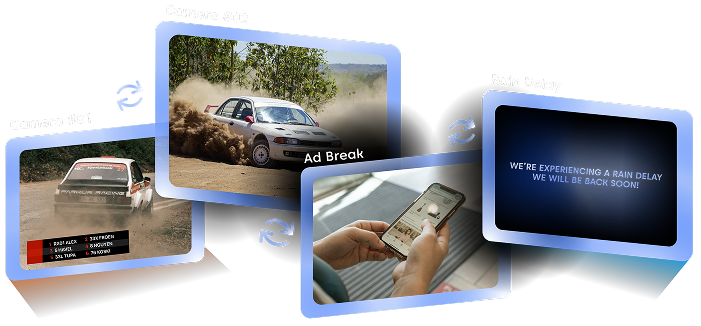
Create unlimited “Flows”—each containing different video sources, graphics, and layouts. Switch between them instantly during your live broadcast with a single click.

Switch between different camera angles

Switch to Commercial break

Switch to “Technical delay” screen

Mix Any Source in One Production

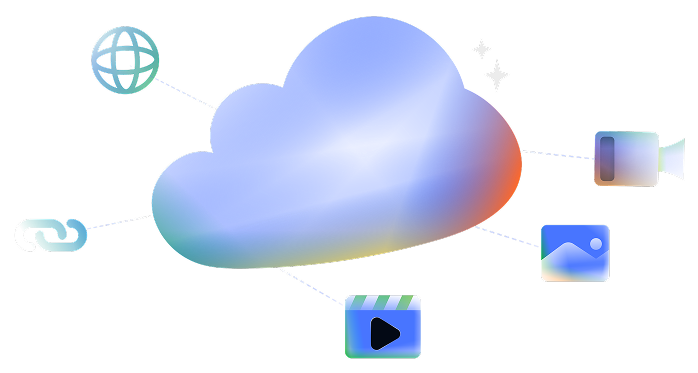
RTMP, RTSP, SRT Streams: Connect live camera feeds, encoder outputs, or other Castr livestreams.

Videos & Images: Add pre-recorded content, sponsor logos, or “Be Right Back” screens from your video library.

Web Widgets & URLs: Embed live graphics, overlays, or widgets from services like StreamElements and Singular.Live.

Dynamic Overlays & Graphics

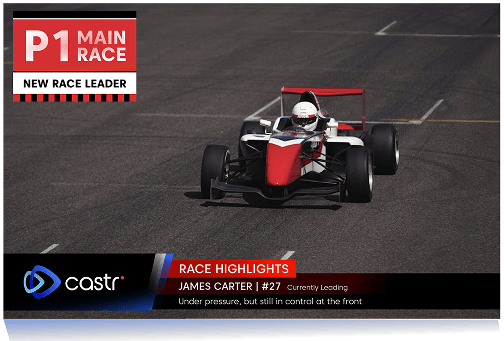
Elevate your production with professional overlays, lower thirds, logos, and real-time graphics. Add web-based widgets as URL sources to display live updates, chat interactions, alerts, or custom animations.

Layer, position, and scale each element exactly where you want it. Adjust transparency, lock positions, or create multi-layered compositions.

Smooth Transition Effects

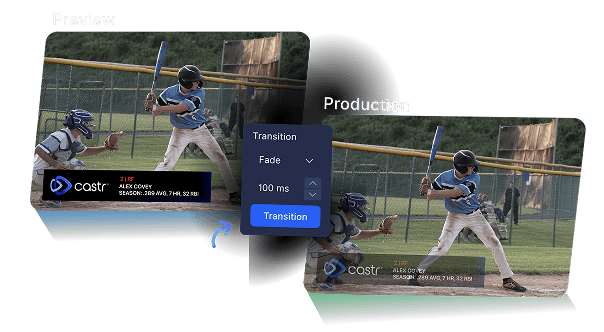
Create polished broadcasts with professional transition effects between scenes. Choose your transition styles and set precise timing down to the millisecond.

The Preview and Production split-view lets you see exactly what’s queued next and what’s currently live. You’ll never have a surprise on air. When ready, hit “Transition” for smooth, broadcast-quality scene changes.

Audio Mixing

Professional audio control for every source in your production. Balance multiple audio sources perfectly in real-time.

Independent volume control per source

Audio sync adjustment

Mute/unmute individual sources

Why Castr Cloud Production?

Enterprise-grade infrastructure

Multi-CDN infrastructure (Akamai, Fastly, CloudFront) with automatic failover and intelligent routing. Deliver the fastest path to millions of viewers—without interruption.

Cost-effective Pricing

Traditional hardware mixers and production setups can cost thousands before you ever go live. With Castr, Cloud Production is included in every plan at no additional cost. No expensive gear, no surprise fees. Just straightforward, transparent pricing.

24/7 Technical Support

Our technical team is available 24/7 via Slack and WhatsApp. Get instant help during live broadcasts, scheduled events, or whenever something unexpected comes up—we’ve got your back.

Multi Input

Mix any video source in one production. Connect live streams (RTMP, RTSP, SRT), videos, images, and web widgets from services like StreamElements and Singular.Live.

Multi Output

Stream to any destination. Output your production to a Castr Livestream, then use Multistream to broadcast simultaneously to YouTube, Facebook, Twitch, LinkedIn, and 30+ platforms. One production, unlimited reach.

100% Cloud-Based

No hardware to buy or set up. No software to download. Just open your browser from any device, set up your live production, and go live. Everything runs in the cloud—ready in minutes.

Frequently asked questions

Can’t find it here? Check out our Help Center.

  • What is Castr?

    Hover

    Castr is a video streaming platform providing livestreaming and video-on-demand (VOD) solutions for streamers and businesses that need online broadcasting solutions.

  • Who is Castr best for?

    Hover

    Castr is best for anyone who wants to stream and host videos for any purpose, whether it’s for gaming, live church services, live TV or business conferences.

  • What is Cloud Production?

    Hover

    Cloud Production is Castr's browser-based live video switcher. It gives you the capabilities of a professional hardware production setup — scene switching, overlays, audio mixing, transitions — all running in the cloud. There's nothing to download or install. Just log in from any device and start producing.

  • Do I need any special hardware or software to use Cloud Production?

    Hover

    No. All you need is a modern web browser and an internet connection. Cloud Production runs entirely in the cloud, so there's no software to install and no hardware switcher to buy. If you're connecting live cameras, you'll need an encoder that outputs RTMP, RTSP, or SRT — but that's the only external requirement.

  • Can I add overlays and graphics to my production?

    Hover

    Yes. You can layer logos, lower thirds, text overlays, and real-time graphics on top of your video. Web-based widgets can be added as URL sources to display live chat, alerts, scoreboards, or custom animations. Every element can be positioned, scaled, and adjusted for transparency.

  • Is there an extra cost for Cloud Production?

    Hover

    No. Cloud Production is included in every Castr plan at no additional cost. There are no hidden fees for using the production features — you get access to the full suite of tools with your subscription.

  • Where can I stream my production to?

    Hover

    You can output your Cloud Production to a Castr Livestream and then use Multistream to broadcast simultaneously to YouTube, Facebook, Twitch, LinkedIn, and 30+ other platforms. One production, unlimited reach.